
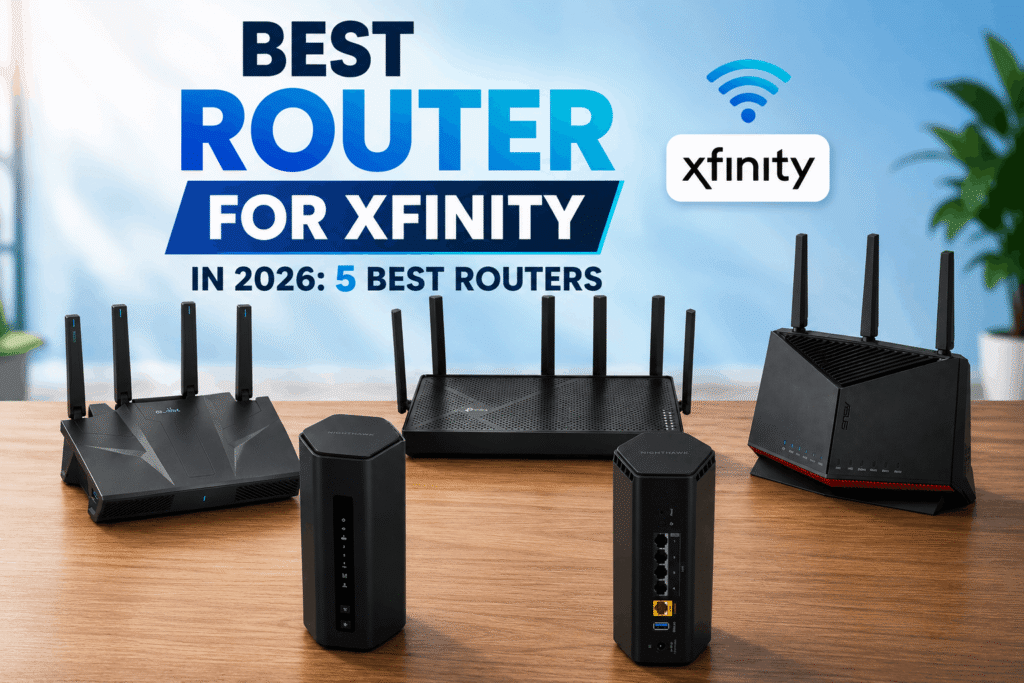
If you’re looking for the best router for Xfinity, choosing the right model can make a big difference in your home’s Wi-Fi performance. Whether you have Xfinity’s 300 Mbps, 500 Mbps, or 1 Gig plan, you need a router that can handle your internet speed while providing reliable Wi-Fi for all your connected devices.
The good news is that you don’t necessarily need to spend hundreds of dollars on a router. Affordable Wi-Fi 7 routers now offer fast wireless performance and 2.5Gbps Ethernet ports, making them more than capable of handling most Xfinity internet plans.
However, the best router for Xfinity isn’t necessarily the most expensive one. Your internet speed, number of connected devices, home size, gaming and streaming needs, VPN usage, and wired networking requirements should all be considered before you buy.
In this guide, we’ve compared five of the best routers for Xfinity, including budget-friendly, value, NETGEAR, VPN-focused, and high-end options. We also explain which router is best for Xfinity 300 Mbps, 500 Mbps, and 1 Gig, so you can choose the right model without spending more than necessary.
Best Routers for Xfinity at a Glance
TP-Link Archer BE230 — Best Budget
Wi-Fi 7 | 2.5Gbps WAN | Best for budget-conscious Xfinity users
TP-Link Archer BE260 — Best Value
Wi-Fi 7 | 2.5Gbps WAN | Best overall balance of price and performance
NETGEAR Nighthawk RS180 — Best NETGEAR
Wi-Fi 7 | 2.5Gbps WAN | Best for users who prefer NETGEAR
GL.iNet Flint 3e — Best for VPN
Wi-Fi 7 | 2.5Gbps WAN | Best for VPN and advanced networking
ASUS RT-BE86U — Best High-End
Wi-Fi 7 | 10Gbps WAN/LAN | Best for power users and multi-gig networks
Affiliate Disclosure: We may earn a commission from qualifying purchases made through links in this article, at no extra cost to you.
Quick Comparison Table
| Router | Best For | Wi-Fi | WAN | Amazon |
|---|---|---|---|---|
|
TP-Link Archer BE230 Best Budget |
Budget users | Wi-Fi 7 | 2.5 Gbps | Check Price |
|
TP-Link Archer BE260 Best Value |
Performance & value | Wi-Fi 7 | 2.5 Gbps | Check Price |
|
NETGEAR Nighthawk RS180 Best NETGEAR |
Easy home setup | Wi-Fi 7 | 2.5 Gbps | Check Price |
|
GL.iNet Flint 3e Best for VPN |
VPN & advanced users | Wi-Fi 7 | 2.5 Gbps | Check Price |
|
ASUS RT-BE86U Best High-End |
Multi-gig & power users | Wi-Fi 7 | 10 Gbps | Check Price |
1. TP-Link Archer BE230 — Best Budget Router for Xfinity
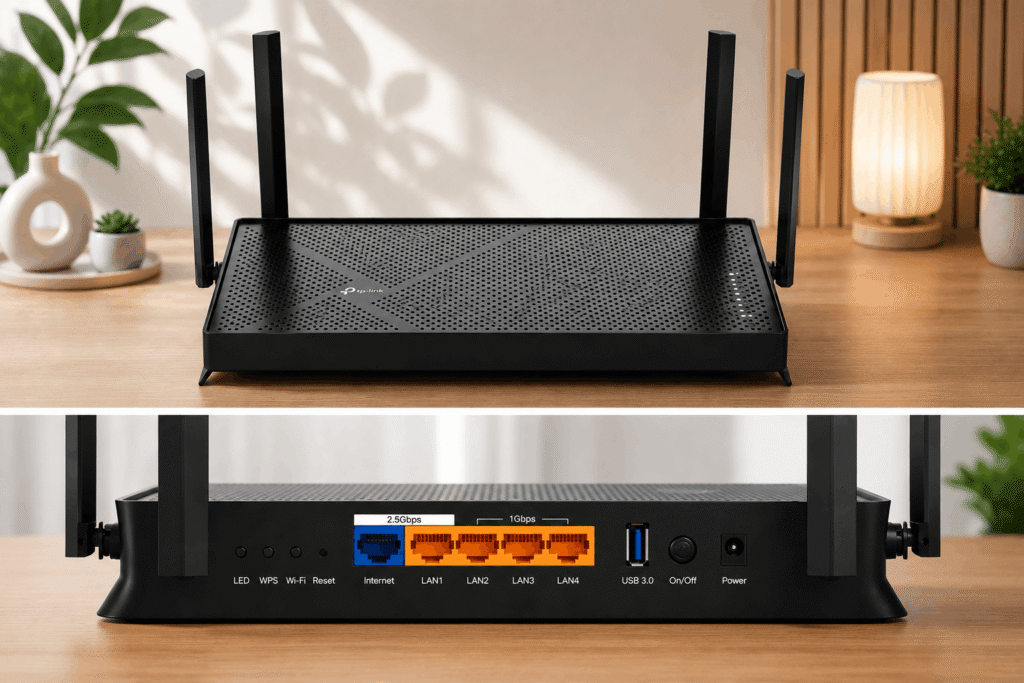
The TP-Link Archer BE230 is our top choice if you want an affordable router for Xfinity without sacrificing modern features.
It supports Wi-Fi 7 and includes a 2.5Gbps WAN port, giving it plenty of capacity for Xfinity’s 300 Mbps, 500 Mbps, and 1 Gig plans.
It also has a 2.5Gbps LAN port, three Gigabit LAN ports, and USB 3.0 connectivity.
For most households, this is more than enough.
If you’re using Xfinity 300 Mbps, you may not need a high-end router. The Archer BE230 already gives you a 2.5Gbps WAN connection, meaning the router has plenty of room for your current internet plan and potential future upgrades.
The router is also a good option for households with multiple phones, laptops, smart TVs, gaming consoles, and smart-home devices.
TP-Link Archer BE230 Features
- Wi-Fi 7
- 2.5Gbps WAN port
- 2.5Gbps LAN port
- Three Gigabit LAN ports
- USB 3.0
- EasyMesh support
- Four external antennas
- Modern Wi-Fi 7 features
Who Should Buy the Archer BE230?
The Archer BE230 is best for users who want a reasonably priced router that can handle fast Xfinity internet without unnecessary premium features.
It’s particularly suitable for:
- Xfinity 300 Mbps
- Xfinity 500 Mbps
- Smaller and medium-sized homes
- Streaming
- Work from home
- Everyday browsing
- Multiple connected devices
2. TP-Link Archer BE260 — Best Value Router for Xfinity
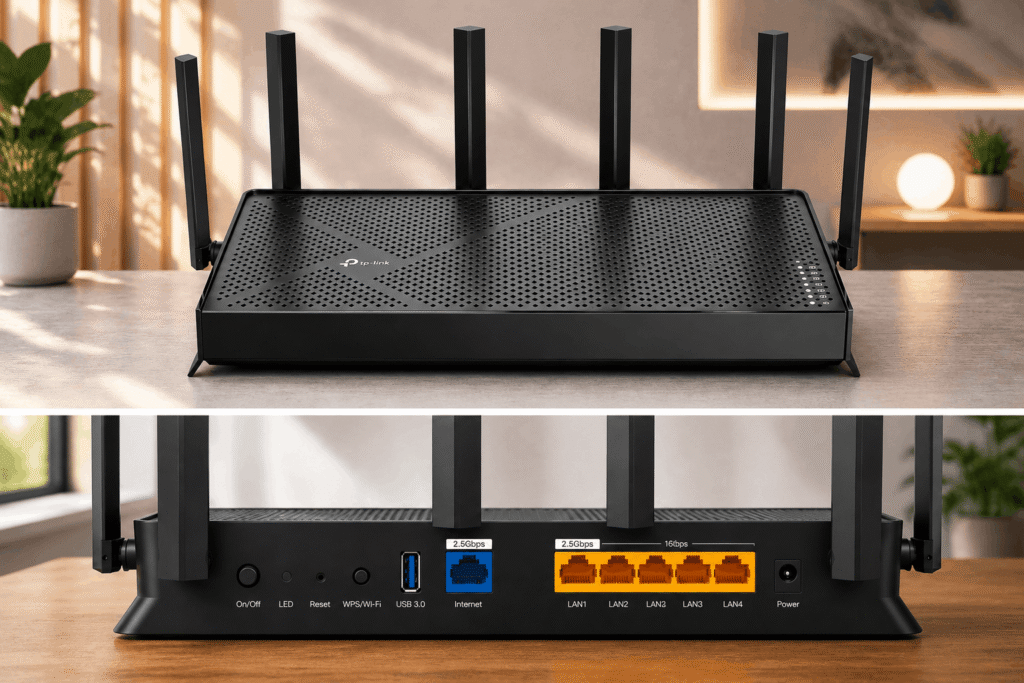
If you want something more capable than the BE230 while still keeping the price reasonable, the TP-Link Archer BE260 is our best-value choice.
The Archer BE260 is a Wi-Fi 7 router with a 2.5Gbps WAN port and a 2.5Gbps LAN port. It also has three additional Gigabit LAN ports and USB 3.0.
This makes it particularly attractive for Xfinity 500 Mbps and 1 Gig customers.
The extra capacity is useful if you have a busy household with multiple people streaming, gaming, working, and browsing simultaneously.
The BE260 also supports features such as EasyMesh and VPN functionality, giving you more flexibility than a basic budget router.
TP-Link Archer BE260 Features
- Wi-Fi 7
- 2.5Gbps WAN port
- 2.5Gbps LAN port
- Three Gigabit LAN ports
- USB 3.0
- EasyMesh support
- VPN client and server support
- Multiple antennas
Who Should Buy the Archer BE260?
The Archer BE260 is an excellent choice if you want a router that balances price, performance, and future-proofing.
It’s especially suitable for:
- Xfinity 500 Mbps
- Xfinity 1 Gig
- Large households
- Multiple devices
- 4K streaming
- Gaming
- Work-from-home users
- Users planning a future internet upgrade
3. NETGEAR Nighthawk RS180 — Best NETGEAR Router for Xfinity
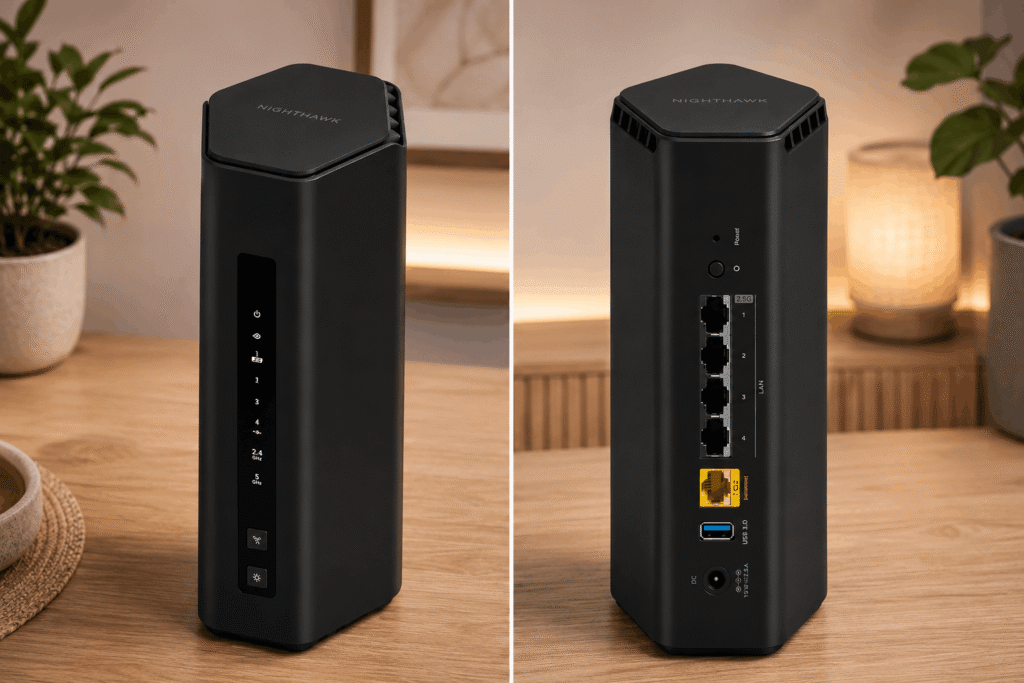
If you prefer NETGEAR routers, the NETGEAR Nighthawk RS180 is a strong option for your Xfinity connection.
The RS180 features Wi-Fi 7 and a 2.5Gbps Internet port. It also provides 2.5Gbps Ethernet connectivity for compatible wired devices.
One advantage of choosing a Nighthawk router is the NETGEAR ecosystem and the Nighthawk app, which is designed to make router setup and network management easier for home users.
The RS180 is a router rather than a cable modem, so you’ll still need compatible modem or gateway equipment for your Xfinity connection.
NETGEAR Nighthawk RS180 Features
- Wi-Fi 7
- 2.5Gbps Internet port
- 2.5Gbps Ethernet connectivity
- Gigabit LAN ports
- USB 3.0
- Nighthawk app
- Modern Wi-Fi 7 technology
Who Should Buy the Nighthawk RS180?
The RS180 is a good choice if you’re already familiar with NETGEAR products or prefer the Nighthawk ecosystem.
It’s suitable for:
- Xfinity 500 Mbps
- Xfinity 1 Gig
- Multiple connected devices
- Streaming
- Gaming
- Home offices
- Users who prefer NETGEAR
4. GL.iNet Flint 3e — Best Router for Xfinity VPN Users
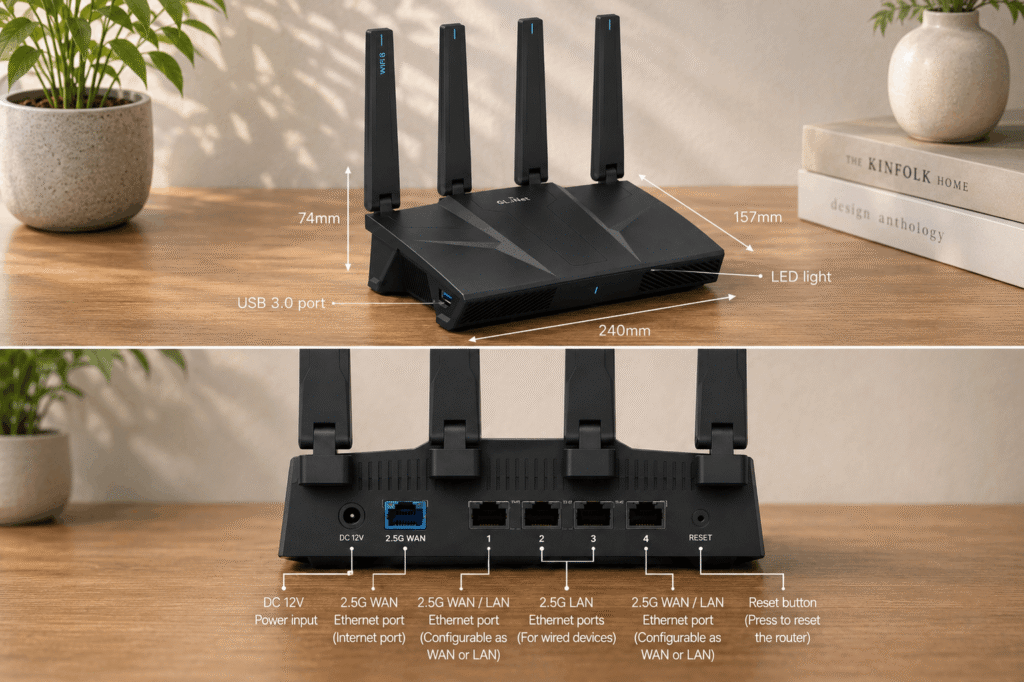
The GL.iNet Flint 3e is the most specialized router on this list.
While the other routers focus primarily on providing fast Wi-Fi for everyday home use, the Flint 3e is particularly interesting for people who want advanced networking and VPN capabilities.
It features Wi-Fi 7 and five 2.5GbE Ethernet ports. That gives you plenty of flexibility for connecting high-speed wired devices.
The Flint 3e also supports WireGuard and OpenVPN-DCO, making it a strong choice if you want VPN functionality directly at the router level.
This can be useful if you want multiple devices in your home to use a VPN without installing VPN software individually on every device.
GL.iNet Flint 3e Features
- Wi-Fi 7
- Five 2.5GbE ports
- WireGuard support
- OpenVPN support
- USB 3.0
- VPN client and server functionality
- AdGuard Home
- Parental controls
- Multi-WAN support
Who Should Buy the Flint 3e?
This router is best suited for:
- VPN users
- Advanced networking users
- Privacy-focused users
- Home offices
- Multiple wired devices
- Users who want greater network control
If you simply want Wi-Fi for Netflix, YouTube, browsing, and social media, you probably don’t need all of these advanced features.
5. ASUS RT-BE86U — Best High-End Router for Xfinity
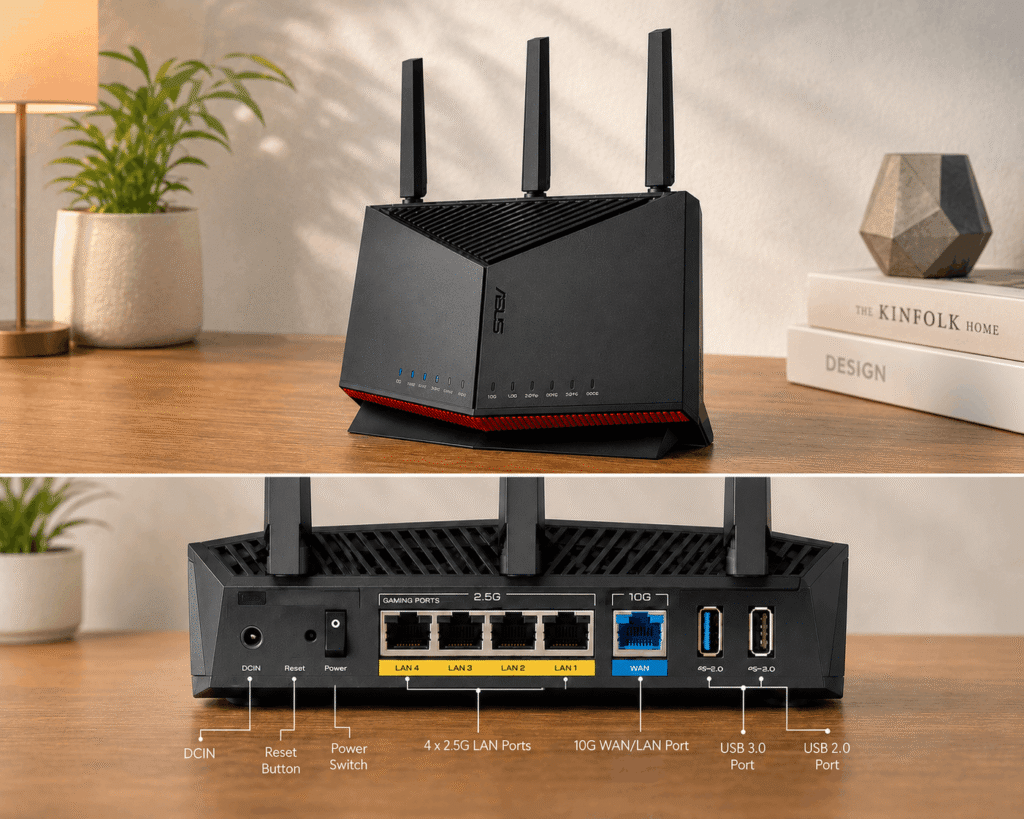
If money isn’t your biggest concern and you want a powerful router with extensive wired connectivity, the ASUS RT-BE86U is the high-end choice in this guide.
The RT-BE86U is a Wi-Fi 7 router with advertised wireless speeds of up to 6,800 Mbps.
Its biggest advantage is its wired connectivity. It features a 10Gbps WAN/LAN port along with multiple 2.5Gbps ports.
That makes it especially useful for power users who have a gaming PC, NAS, workstation, home server, or other multi-gig devices.
For a normal 300 Mbps Xfinity connection, this router would be overkill. But if you’re using 1 Gig service and have a demanding home network, its extra connectivity can be worthwhile.
ASUS RT-BE86U Features
- Wi-Fi 7
- Up to 6,800 Mbps advertised wireless speed
- 10Gbps WAN/LAN port
- Multiple 2.5Gbps Ethernet ports
- 2.6GHz quad-core processor
- AiMesh support
- Multi-WAN
- Advanced networking features
- USB connectivity
Who Should Buy the ASUS RT-BE86U?
This router is best for:
- Xfinity 1 Gig
- Power users
- Gaming
- NAS users
- Home servers
- Multi-gig wired networks
- Users who want a premium router
Best Router for Xfinity 300 Mbps
If you have an Xfinity 300 Mbps plan, you don’t need to spend a lot of money on a router.
Our recommendation is the TP-Link Archer BE230.
Its 2.5Gbps WAN port provides considerably more capacity than a 300 Mbps connection requires, while Wi-Fi 7 gives you modern wireless technology.
For a typical household that browses the web, streams video, works from home, and uses several smart devices, the BE230 should be more than capable.
Best Choice for Xfinity 300 Mbps
TP-Link Archer BE230
It’s affordable, fast, and gives you plenty of room for a future internet upgrade.
Best Router for Xfinity 500 Mbps
For an Xfinity 500 Mbps connection, we recommend the TP-Link Archer BE260.
The BE260 provides a 2.5Gbps WAN port and Wi-Fi 7, giving you plenty of capacity for multiple devices.
It’s a particularly good choice for families where several people are using the internet simultaneously.
For example, one person could be streaming 4K video while another is gaming, another is working from home, and several phones and smart devices remain connected.
Best Choice for Xfinity 500 Mbps
TP-Link Archer BE260
It offers a good balance between performance and price.
Best Router for Xfinity 1 Gig
If you have Xfinity 1 Gig, you have several good choices.
For most people, the TP-Link Archer BE260 provides enough performance.
However, power users may want the ASUS RT-BE86U because of its 10Gbps connectivity and multiple 2.5Gbps ports.
If you regularly transfer large files across your local network, use a NAS, or have several multi-gig wired devices, the ASUS is worth considering.
Best Value for Xfinity 1 Gig
TP-Link Archer BE260
Best High-End Option
ASUS RT-BE86U
Best Router for Xfinity WiFi
The best router for Xfinity WiFi depends on your home and the devices you use.
For most users, Wi-Fi 7 is an excellent choice because it provides newer wireless technology and can offer better performance with compatible devices.
However, your router isn’t the only factor that determines Wi-Fi performance.
Your home’s construction, walls, floors, router placement, interference, and client devices can all affect Wi-Fi speed.
If you have a large house, buying a more expensive single router isn’t always the best solution. A mesh Wi-Fi system may provide better coverage.
Do You Need a Modem for Xfinity?
Yes, you need appropriate modem or gateway equipment to connect your home to Xfinity’s internet service.
However, you should understand that a router is not the same as a modem.
A modem or gateway connects to your internet provider, while the router manages your home’s Wi-Fi and wired network.
The five products in this guide are routers.
If you already have an Xfinity gateway, you may be able to connect your own router to it depending on your setup.
Before purchasing your equipment, check Xfinity’s current compatibility and equipment requirements for your specific plan.
Can You Use Your Own Router With Xfinity?
Yes, you can use your own router with Xfinity in supported setups.
Many customers use an Xfinity gateway together with their own router, while others use compatible third-party networking equipment.
The exact configuration depends on your equipment.
If you use an Xfinity gateway with your own router, you’ll also want to configure the equipment correctly to avoid unnecessary networking problems such as double NAT.
If you’re purchasing your own modem as well, make sure it is compatible with your Xfinity service before buying.
What to Look for When Buying the Best Router for Xfinity
1. Check Your Xfinity Internet Speed
Start with your internet plan.
A 300 Mbps customer has very different requirements from someone using a 1 Gig connection.
You don’t need a $200 router just because it’s faster on paper.
2. Look at the WAN Port
The WAN port connects your router to your modem or gateway.
For a new router, a 2.5Gbps WAN port is a good choice because it provides additional headroom for faster internet plans and future upgrades.
3. Consider Wi-Fi 7
Wi-Fi 7 is the newest wireless standard represented in our five picks.
It can provide higher theoretical throughput and improved wireless efficiency, but you’ll need compatible Wi-Fi 7 client devices to take advantage of its newest capabilities.
4. Check the Ethernet Ports
If you have a gaming PC, NAS, desktop computer, or home server, don’t focus only on Wi-Fi.
Look at the Ethernet ports as well.
A router with 2.5Gbps or 10Gbps Ethernet can be much more useful for high-speed local networking.
5. Consider Wi-Fi Coverage
A powerful router doesn’t guarantee excellent Wi-Fi everywhere in your house.
If you have thick walls, multiple floors, or a large home, consider a mesh system instead of simply buying the most expensive router.
6. Consider VPN Support
If you frequently use VPN services, consider a router with built-in VPN functionality.
The GL.iNet Flint 3e is particularly well suited to this type of user.
Is Wi-Fi 7 Worth It for Xfinity?
For a 300 Mbps Xfinity connection, Wi-Fi 7 isn’t necessary.
A good Wi-Fi 6 router can already handle that speed.
However, Wi-Fi 7 can still be attractive if you’re buying a new router today.
It gives you access to newer wireless technology and can provide more room for future internet upgrades and newer Wi-Fi devices.
If the price difference isn’t significant, choosing Wi-Fi 7 can make sense for a long-term purchase.
Just remember that your internet speed won’t automatically increase because you bought a Wi-Fi 7 router.
Which Router Is Best for Xfinity?
Here is our final recommendation:
Best Budget
TP-Link Archer BE230
Best for Xfinity 300 Mbps and budget-conscious users.
Best Value
TP-Link Archer BE260
Best overall combination of price and performance.
Best NETGEAR
NETGEAR Nighthawk RS180
Best for users who prefer the NETGEAR ecosystem.
Best for VPN
GL.iNet Flint 3e
Best for VPN users and advanced networking.
Best High-End
ASUS RT-BE86U
Best for power users and multi-gig home networks.
Final Verdict
The best router for Xfinity isn’t necessarily the most expensive router you can buy.
For most people, the TP-Link Archer BE230 is an excellent budget option, especially for Xfinity 300 Mbps.
If you have 500 Mbps or 1 Gig service and want a better balance of performance and features, the TP-Link Archer BE260 is our top value recommendation.
The NETGEAR Nighthawk RS180 is a good choice if you prefer NETGEAR, while the GL.iNet Flint 3e is the better option for VPN and advanced networking.
For power users who want extensive multi-gig connectivity, the ASUS RT-BE86U is the high-end choice.
Ultimately, choose your router based on your Xfinity plan, number of connected devices, home size, wired networking requirements, and the features you actually need. You don’t need to spend more than necessary to get excellent performance from your Xfinity internet connection.
Frequently Asked Questions
What is the best router for Xfinity?
The TP-Link Archer BE230 is our best budget choice for Xfinity, while the TP-Link Archer BE260 is our best overall value option. The right choice depends on your Xfinity plan, home size, number of devices, and networking requirements.
What is the best router for Xfinity 300 Mbps?
The TP-Link Archer BE230 is our top choice for Xfinity 300 Mbps. It provides Wi-Fi 7 and a 2.5Gbps WAN port, giving you plenty of capacity without spending too much on a router.
What is the best router for Xfinity 500 Mbps?
The TP-Link Archer BE260 is our preferred option for Xfinity 500 Mbps. Its Wi-Fi 7 support and 2.5Gbps WAN port provide plenty of performance for busy households with multiple connected devices.
What is the best router for Xfinity 1 Gig?
The TP-Link Archer BE260 is an excellent value choice for Xfinity 1 Gig. If you have multiple multi-gig wired devices or want a premium home network, the ASUS RT-BE86U is the better high-end option.
Can I use my own router with Xfinity?
Yes, you can use your own router with Xfinity in supported configurations. The exact setup depends on whether you are using an Xfinity gateway, compatible modem, or another network configuration.
Do I need a modem and router for Xfinity?
You need equipment that connects your home to Xfinity’s network and a router to manage your home network. Some Xfinity gateways combine modem and router functions in a single device, while other setups use separate devices.
Is Wi-Fi 7 worth it for Xfinity?
Wi-Fi 7 isn’t necessary for a 300 Mbps connection, but it can be worthwhile if you have newer Wi-Fi 7 devices, a faster Xfinity plan, many connected devices, or want a newer router that can remain useful for future upgrades.
Do I need a 2.5Gbps WAN port for Xfinity?
You don’t need a 2.5Gbps WAN port for a 300 Mbps plan. However, it is a useful feature when buying a new router because it provides additional capacity for faster internet plans and future upgrades.
What is the best Xfinity router for VPN?
The GL.iNet Flint 3e is our preferred option for VPN users. It provides advanced VPN functionality, including WireGuard and OpenVPN support, along with multiple 2.5GbE ports.
What is the best Wi-Fi router for Xfinity?
For most users, the TP-Link Archer BE230 is an excellent affordable Wi-Fi 7 router for Xfinity. The Archer BE260 is a better choice if you want additional performance and features.